Key takeaways
- Look beyond a single posture snapshot: assess how repetition, force, task duration and recovery combine across the work cycle.
- Use task observation alongside worker feedback to identify discomfort and strain that may not be visible from the workstation alone.
- Account for mixed-model variation. Different products and task assignments can change physical demands, even when the line setup stays the same.
- Assess hand actions such as pinching, gripping and pressing for both repetition and effort, not just the weight of the components.
- Use a fuller task assessment to decide whether workstation changes, work organisation or an exoskeleton trial is the most relevant next step.
Table of Contents
- Why can a posture-only assessment miss the main risk?
- How do ergonomic risk factors cause injuries?
- Repetitive pinching, gripping, pressing, and activation
- Ergonomic risk in mixed-model assembly lines
- What are the main ergonomic risk factors in manual assembly work?
- Ryggo: RULA based ergonomics assessments: unlimited and free of charge, helps to decide the type of exoskeleton that is needed.
Why can a posture-only assessment miss the main risk?
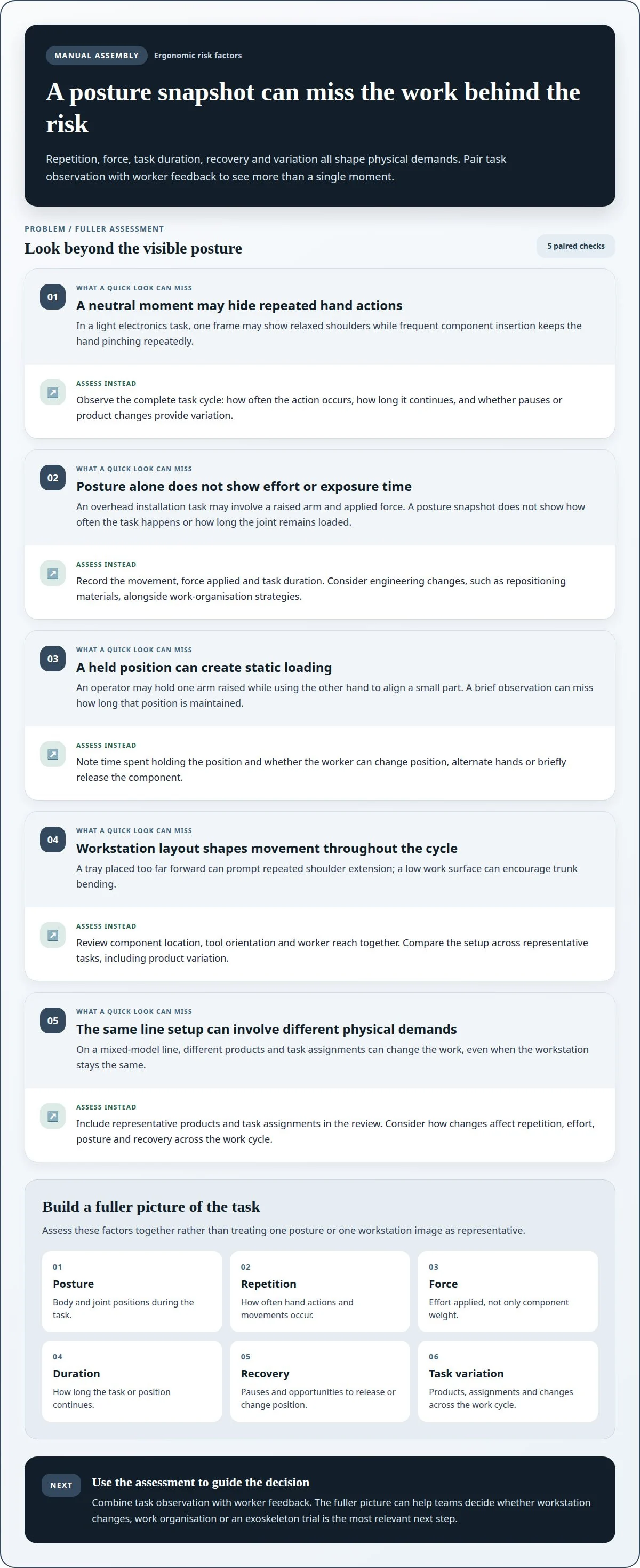
A posture snapshot captures one moment, not the full work cycle. In manual assembly, repetition, force, task duration and recovery all affect physical demands.
Limits of posture-only assessment
A posture-only assessment scores visible body positions but can miss how often and how long actions occur. A worker may appear neutral during a brief observation yet repeat the same hand movement throughout a shift. Posture is only one part of ergonomic exposure, alongside exertion and time.
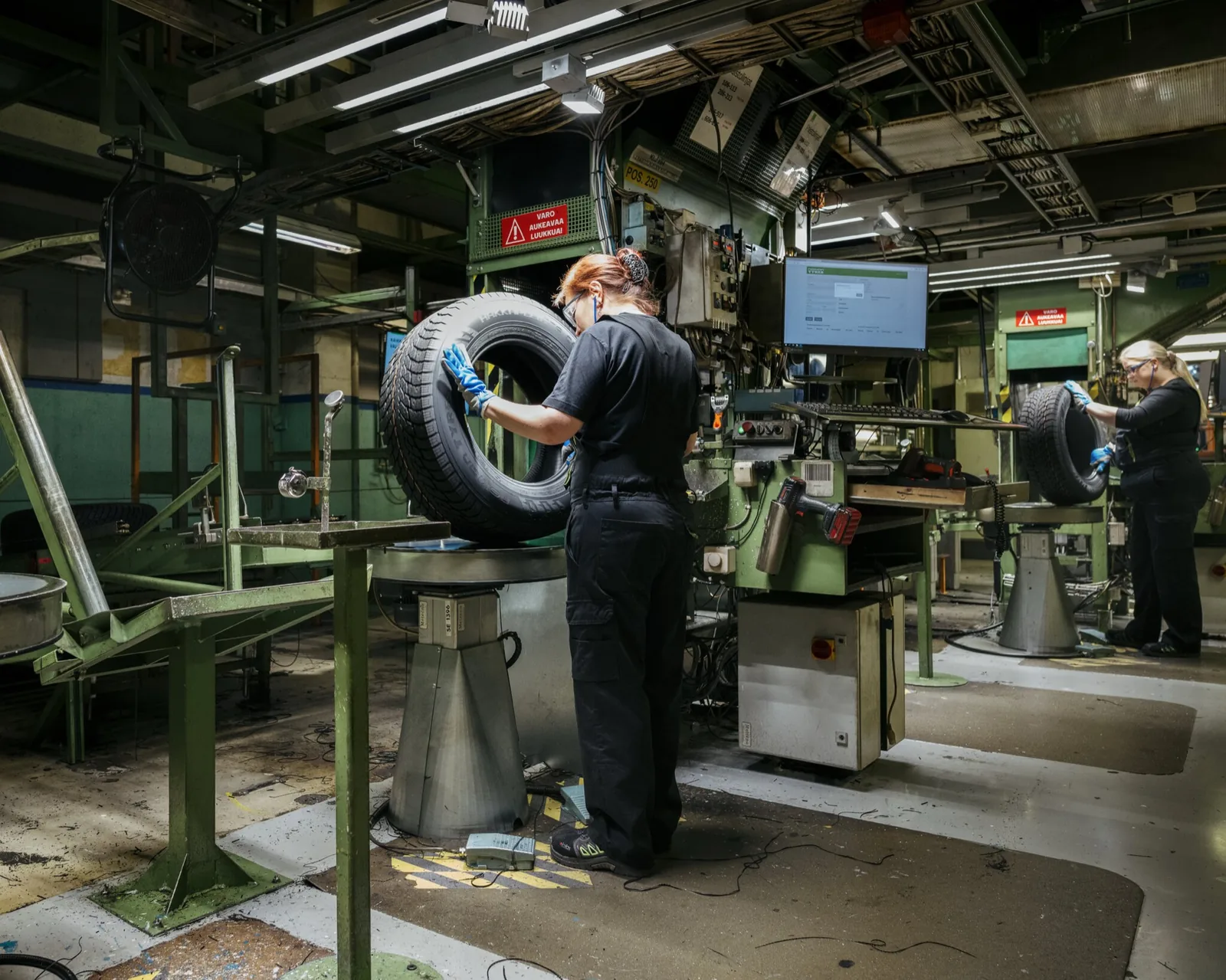
Consider a light electronics task involving frequent component insertion. One frame may show relaxed shoulders, while repeated pinching keeps the hand working with little variation. Assess the complete task cycle, including pauses and changes between products, rather than treating one workstation image as representative of the whole workplace.
Awkward postures and joint strain
Awkward postures place joints outside comfortable working positions, such as reaching overhead or bending the trunk. On a construction site, a worker installing components above shoulder height may hold the arm raised while applying force. The posture alone does not show how often the task occurs or how long the joint remains loaded.
Those details affect the assessment. A brief reach differs from sustained overhead work. Record the movement, force applied and task duration, then consider engineering changes, such as repositioning materials, alongside work-organisation strategies. This gives HSE teams a clearer basis for addressing strain than posture scoring alone.
Upper-limb posture and static loading
Static loading occurs when muscles support a position with little movement, such as held upper arms or a fixed wrist. During assembly, an operator might keep one arm raised while aligning a small part with the other hand. A short observation can capture the position but miss its cumulative effect over the work period.
Assess both the arm position and the time spent holding it. Note whether the worker can change position, alternate hands or briefly release the component. These observations help distinguish a momentary posture from sustained loading and show where task design may increase strain.
Workstation setup and neutral posture
A workstation supports neutral posture when tools and components are within comfortable reach. A tray placed too far forward can prompt repeated shoulder extension, while a low work surface can encourage trunk bending. The setup shapes movement throughout each cycle, not just the posture visible in one assessment.
Review component location, tool orientation and worker reach together. Bringing frequently handled parts closer may reduce unnecessary reaching, while product variation can still create awkward positions. Compare the setup across representative tasks, then consider engineering strategies that accommodate the full range of assembly work.
A more complete assessment considers posture alongside repetition, force, duration and task variation. For example, a four-hour task period can reveal sustained exposure that a brief posture check misses. Combined observations help teams identify where work design, workstation changes or other controls deserve attention.
How do ergonomic risk factors cause injuries?
Ergonomic risks can build when repeated demands exceed the body’s opportunity to recover. In manufacturing, observing tasks and listening to workers can show how work contributes to strain.
Observing work and reviewing injury records
Work observation involves watching a task and comparing its physical demands with reported problems. Record the actions workers perform, their postures, applied force, task pace and opportunities to recover. Observing a complete assembly sequence can reveal demands that a brief view of one station misses.
Then compare the observations with incident reports from the previous 12 months. For example, recurring hand discomfort alongside repeated component pressing may point to a task needing closer assessment.
Records show patterns, while interviews help explain them. Ask workers which actions feel demanding, when discomfort arises and whether task changes affect it. A worker might describe a connector that needs repeated thumb pressure; observation can confirm the hand position and pace. Together, these details give HSE teams a clearer view of exposure.
Effects on health and productivity
Repeated ergonomic risks can contribute to musculoskeletal disorders, affecting muscles, tendons and joints. Symptoms may include discomfort or reduced function during tasks such as gripping, reaching or placing components. A worker who changes posture to manage discomfort may also find it harder to perform the task consistently.
In a production line, discomfort can affect both the worker and the process. Slower handling or short pauses to ease a sore wrist may affect task flow, while continued exposure can make the underlying problem harder to manage. Output figures alone do not capture these effects. Worker feedback can help identify problems earlier.
Task assignment also shapes exposure. Rebalancing work between employees or stations can change ergonomic risk, even when the line retains the same number of stations and cycle time. Moving a task to a station with different reach demands may alter posture and effort. Review who performs each task, where it occurs and how reports change after reassignment.
Use observations, records and worker interviews as complementary evidence. If reports identify recurring strain at a particular task, compare its actions and assignment with those of other stations. This helps distinguish a workstation issue from a workload pattern and supports a targeted response instead of a broad change that misses the source.
Repetitive pinching, gripping, pressing, and activation
Small components can require sustained hand effort, even when they weigh little. Assess the action, force, repetition and recovery together to identify ergonomic hazards that a posture snapshot may miss.
Repeated pinching, gripping, and pressing
Repeated hand actions use the fingers and wrist to hold, position or activate components. An operator might pinch a wire, press it into a terminal, then grip a tool before repeating the sequence. Each action can place stress on hand tissues, especially when forceful handling continues without task variation.
Repetitive motions in assembly-line work
For example, installing connectors may involve alternating between thumb pressure and wrist rotation. The parts may be light, but repeated actions can stress the same musculoskeletal structures. Record task sequence and force alongside cycle time to see which actions drive exposure.
Recovery time between repetitive motions
Recovery time gives loaded muscles and tendons an opportunity to rest or perform different movements. Repeating one action without meaningful variation can leave little recovery between efforts. In assembly, a brief pause between products may not provide the same relief as alternating tasks that use different movements.
Assess whether workers can release tools, change hand positions or move to a different task. A continuous repetitive sequence places different demands on the body from one interrupted by varied handling. This distinction helps identify controls that address exposure, rather than simply asking workers to maintain pace.
Cycle time alone does not describe the full load. Compare the actions within each cycle, the force required and how often workers repeat them. Also record whether the task changes between product variants or stations, since variation can alter both effort and movement.
Controls should target the source of stress. Engineering changes may reduce the force needed to activate a component, while task variation can distribute repeated actions. These strategies aim to prevent avoidable exposure, not guarantee an injury-free shift. Include worker feedback, especially when discomfort relates to a specific action or product.
Ready to find the right device for your operation?
Ergonomic risk in mixed-model assembly lines
A mixed-model line builds different product variants using shared people, stations or equipment. The same station may therefore involve different reaches, grips and force demands across a shift.
That variation makes assessment more challenging: a standard product may not reveal the task with the highest demands. One variant might require placing a small connector close to the body, while another involves reaching into a deeper assembly. Assessing only the first task could leave the second task’s awkward reach overlooked. Map the work by product variant, station and assigned action, not by station name alone.
Line balance also shapes exposure. Reassigning a task to another station can change ergonomic risk even when the number of stations and cycle time remain unchanged. Moving a fastening operation, for example, may shift repeated wrist work to a station already handling frequent component placement. The issue is not just the task itself, but how tasks combine at each station and for each worker.
Compare task assignments across variants before changing the line. Record the actions required for each product, where components are presented, and whether workers must reach, rotate or apply force. Then identify stations where several demanding actions accumulate. This gives a practical picture of hazards that a single product walkthrough or average cycle may hide.
Workstation redesign, task redistribution and job rotation can address assembly-line ergonomic risks. Redesign might change how a component is presented; redistribution might move an action to a less-loaded station. Rotation can vary exposure when workers move between tasks with different physical demands. Assess these options against the actual sequence of variants instead of applying generic fixes.
An assembly-line assessment can combine observational ergonomic assessment, digital ergonomics tools and multi-criteria decision-making. Observation captures what workers do; digital tools can help compare postures or task configurations; multi-criteria analysis can bring operational needs into the decision. A change that reduces reaching at one station, for instance, should also be considered in light of its effects on adjacent operations.
Use a representative production mix when evaluating a proposed change. Compare current and revised assignments for each variant, noting task content, component location and worker movement. If a station’s workload changes, reassess the new combination rather than assuming the previous result still applies. In mixed-model assembly, ergonomic risk follows task assignment, not just the workstation or cycle time.
What are the main ergonomic risk factors in manual assembly work?
The main risks combine physical effort with how long and how often a task is performed. At an electronics workstation, a worker might reach for components, hold a part steady and apply pressure during assembly. Assessing only the component’s weight misses repetition, posture, force and recovery, which together shape exposure.
Repetition and force matter when workers perform similar actions repeatedly or use substantial effort. Pinching a small part, pressing a connector into place or squeezing a hand tool loads the hands in different ways. A task assessment should distinguish light, frequent actions from forceful, less frequent ones; both patterns can stress musculoskeletal structures.
Awkward or sustained posture changes how the body supports a task. An electrician wiring a panel above shoulder height for two hours combines overhead arm positioning with task duration. In assembly, a low parts bin may prompt repeated trunk bending. Identify the body region involved, the movement required and whether the position is held or repeated.
Handling and lifting add demands beyond fine hand movements. A worker may lift a component, turn to place it, then reach for the next item. Load position, grip and travel path affect the effort required. Review the full handling sequence, including where materials begin and end, rather than assessing a lift in isolation.
Contact stress and constrained movement can also shape exposure. An operator resting a wrist against a hard workstation edge while positioning parts experiences pressure at the contact point. A tight fixture or crowded station may limit movement and make each action less comfortable. Check tool handles, edges, clearances and component access during normal production.
These ergonomic risk factors in manual assembly can occur together. A worker might repeatedly grip a tool while reaching across a workstation, with little opportunity to change posture. Assess combined task demands, not just one hazard at a time. Worker reports can help identify which action feels most demanding and when discomfort arises.
For a practical assessment, map each task against repetition, force, posture, duration, handling and recovery. Compare the most demanding product variants and station assignments, then identify whether workstation changes or task redistribution address the source. This makes the decision specific to the operation. An exoskeleton is a possible ergonomics measure only when its support matches the task and can be evaluated in use.
Not sure which exoskeleton fits your task? Let the Ryggo advisor match it independently.
Ryggo: RULA based ergonomics assessments: unlimited and free of charge, helps to decide the type of exoskeleton that is needed.
Ryggo provides an automated RULA-based screening estimate to help identify which type of exoskeleton may suit a task. For repetitive assembly, this can connect observed postures with the support required, rather than relying on product descriptions alone. It does not replace professional ergonomic consultancy.
When an exoskeleton appears relevant, Ryggo’s AI-powered recommendation and vendor-neutral device comparison help narrow the options. Companies can then use Deploy & Decide to trial an exoskeleton before purchasing, assessing its fit within the actual task and workplace.
This approach is useful when an assessment points to physical demands an exoskeleton may support, but the right device is not yet clear. Contact Ryggo about your assembly task to discuss the next step.
Turn the assessment into an operational decision
The next step is to choose a representative assembly task for closer evaluation. Select work that reflects the real product mix, pace and worker movements, rather than an idealised demonstration. This gives operations and HSE teams a shared basis for deciding what should change and what outcome matters.
Use the identified ergonomic risk factors in manual assembly to frame the decision. Which task demand needs attention? What would a useful change look like for workers and production? Keep the criteria practical, then assess whether an exoskeleton supports the task without disrupting handling, movement or the wider workflow. A trial can inform that decision in the actual work setting.
Exoskeletons are one possible ergonomics measure, not a substitute for addressing workstation or task design. If the assessment points to exploring device options, take the next step at a pace that suits your operation. Contact Ryggo about assembly ergonomics to discuss your requirements and evaluate the options on a clear basis.
Frequently asked questions
How should safety teams assess hand-intensive electronics work?
Assess the full sequence, from picking a component to completing its connection. Note which fingers and tools are used, how parts are stabilised, and whether workers switch hands or tasks. Compare product variants, including rework, since fault correction may involve extra gripping or pressing. Ask operators which actions cause discomfort, then compare their reports with observed movements to identify where the task places the greatest demand.
Which controls actually reduce the exposure?
Start by changing the task or workstation where the exposure originates. A fixture that holds a small component, for example, can reduce the need to pinch it during assembly. A tool suited to the connection may also reduce the required force. Other options include repositioning parts, redistributing tasks and varying movements. Assess the revised process in production, because a change at one station can shift demands elsewhere.
Which electronics manufacturing jobs can hide the most exposure?
Connector insertion, cable routing, soldering, crimping and detailed inspection can hide physical demands. A worker may handle light parts but still maintain a fixed grip, apply precise pressure or bend the neck forward to see a small connection. Rework can add handling after initial assembly. Observe less visible actions, such as stabilising wires or adjusting a tool, rather than judging exposure by component weight alone.
How do repetition, force, awkward posture, and vibration contribute to musculoskeletal disorders in assembly workers?
Repetition gives muscles and tendons less opportunity to recover between similar actions. Force increases the effort required, while awkward wrist, shoulder or trunk positions change how that effort is supported. Vibrating tools add another physical demand. Repeated fastening with a vibrating tool, for example, may combine grip force, wrist movement and tool exposure. Assess these factors together, since a single hazard measure cannot describe the whole task.
How can workstation height, reach distance, and tool design reduce ergonomic risks in manual assembly?
Set up the workstation so frequently used parts and tools are within reach, without repeated leaning or shoulder extension. The work surface should let the operator see and handle components without sustained neck bending. Tool handles and triggers should suit the task and support a stable grip. Review the setup with workers of different heights and across product variants, since one fixed arrangement may not suit every operator or operation.
What are effective ways to reduce lifting, pushing, and carrying risks on assembly lines?
Reduce manual handling by bringing components closer to the point of use and using suitable mechanical aids for heavier or awkward items. Keep transfer routes clear, and position containers to avoid unnecessary lifting from floor level or reaching across the line. A wheeled supply trolley, for example, can reduce repeated carrying between storage and assembly. Check that the aid suits the route, load and task before changing the process.
How do cycle time, job rotation, and rest breaks affect ergonomic risk in manual assembly?
A short cycle can increase how often the same action is repeated, especially when workers have little control over pace. Rotation can help only if the alternate task uses different movements and body regions; switching between two similar gripping tasks may not change exposure. Breaks provide recovery, but their value depends on task demands and timing. Review actual task sequences and worker feedback before deciding whether rotation or recovery changes are useful.
What symptoms and injuries are associated with ergonomic hazards in manual assembly workers?
Workers may report pain, stiffness, tenderness, tingling, numbness or reduced grip during or after tasks. Depending on the work, symptoms may affect the hands, wrists, shoulders, neck or back. These signs do not identify a cause on their own. Record when they occur, which actions bring them on and whether they ease when tasks change. Early reporting helps teams investigate the task and respond before discomfort affects normal work.
Find the right device before you trial anything
The Ryggo advisor maps your task, environment, and requirements to compatible devices — independently, across the full European market.