Key takeaways
- Prioritise work steps with sustained holding, overhead activity or repetitive movement under load, then assess whether the task reflects normal working conditions.
- Compare work with and without the exoskeleton under similar conditions, and record workload differences so they don’t distort the result.
- Set criteria for proceeding, revising or stopping before the pilot begins, including how worker acceptance and adverse effects will be assessed.
- Track actual wear time, task changes and employee feedback alongside workflow and equipment observations.
- Consider how the device affects movement, comfort and the wider workday before deciding whether the task is suitable for expansion.
Table of Contents
- Matching comparisons with and without the device
- Defining pilot tasks and decision criteria
- Selecting specific work steps for a pilot
- Integrating exoskeleton evaluation with workplace ergonomics
- What worker, task, and environment factors make a task unsuitable for an exoskeleton?
- Ryggo
Matching comparisons with and without the device
Match passive devices to tasks they support mechanically, and consider powered assistance where a passive design cannot deliver enough support. Compare pilot costs with measured changes in work volume, task time, wear time and worker experience, rather than assuming benefits.

-
How a professional matches device types to tasks
Screen devices against the movement and load demands of the selected work step. Passive exoskeletons use springs or cables and require no power, so assess whether their assistance matches the task. Don’t select by device category alone: check movement compatibility, workspace constraints and whether the device interferes with adjacent steps.
Include representative workers across the workforce’s anthropometric range. Trial several sizes, then adjust interfaces to the wearer’s legs and torso. A device that fits one worker may not suit another. Record the device version, settings, wearer code and task configuration so the comparison reflects a specific worker-device-task pairing, not a general impression of the model.
-
Allow for learning and habituation
Build training and familiarisation into the pilot before treating early use as representative. Workers need time to learn how assistance affects movement and how to use the device during the task. Record the training completed, questions raised and adjustments made. If a worker changes their movement sequence while learning, note that alongside your observations rather than treating it as a stable device effect.
Collect feedback early in use, then continue gathering it as workers gain experience. Ask about comfort, perceived support, restrictions and reasons for removing the device. Keep each response linked to the task and configuration. This helps distinguish an initial fit or learning issue from a persistent mismatch that could affect whether workers choose to wear the device.
-
How a professional compares work with and without the device
Compare the same task under similar working conditions, with and without the exoskeleton. Record the shift, work volume, breaks, actual wear time and field observations, and note workload differences separately. For example, don’t attribute lower output on a quieter shift to the device. Track movement sequence, timing and process stability alongside the worker’s reported experience.
Record the test configuration consistently. ASTM International says ASTM F3576-22 provides a practice for recording an exoskeleton test configuration. Use those configuration details alongside task and wearer records when interpreting results. Compare pilot expenditure with observed operational outcomes and wearer feedback; include relevant deployment and training time, and separate measured changes from expectations. Missing observations should remain identifiable, not be treated as zero.
Defining pilot tasks and decision criteria
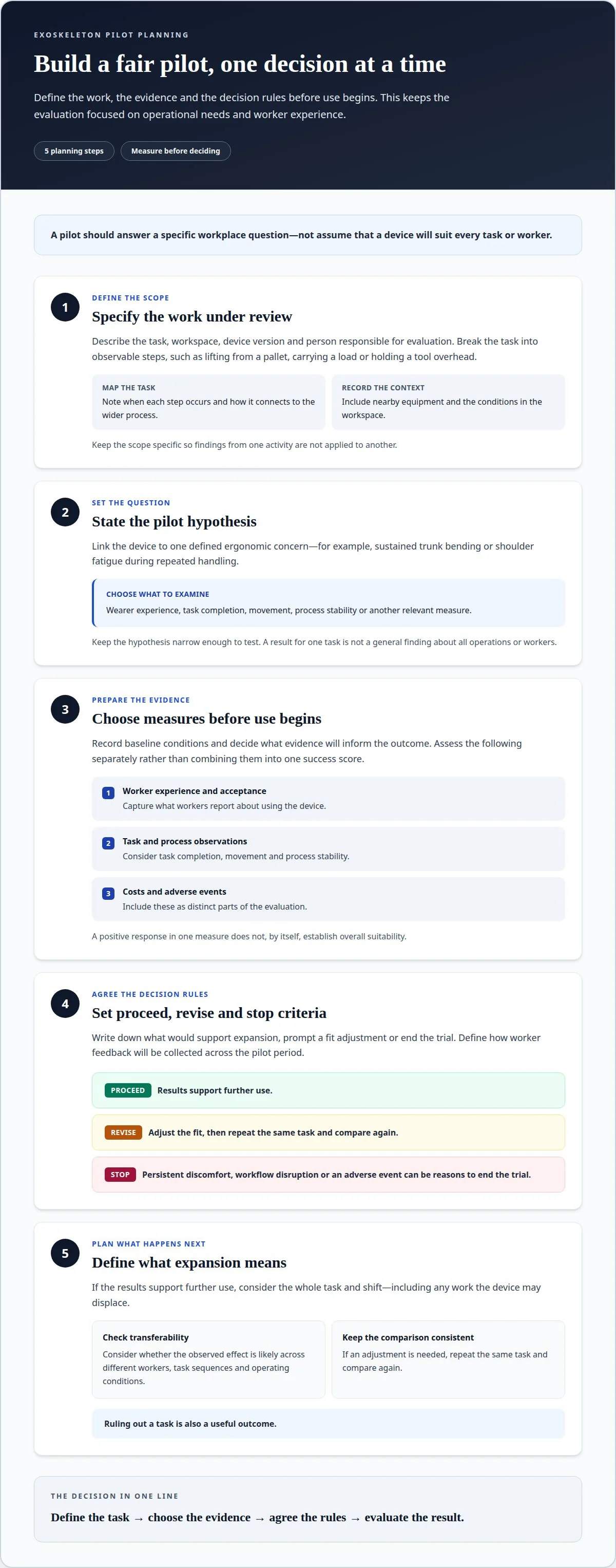
To decide how to select tasks for an exoskeleton pilot, first define the work, the intended outcome and the evidence you need. This keeps the pilot focused on operational needs, worker experience and observable effects, rather than enthusiasm for a device.
- Specify the work under review. Describe the task, workspace, device version and person responsible for evaluation. Break the task into observable steps, such as lifting from a pallet, carrying a load or holding a tool overhead. Note when each step occurs, the equipment around the worker and how the task connects to the wider process. This gives everyone the same scope and prevents results from one activity being applied to another.
- State the pilot hypothesis. Link the device to a specific ergonomic concern, such as sustained trunk bending or shoulder fatigue during repeated handling. Define what the pilot will examine: wearer experience, task completion, movement, process stability or another relevant measure. Keep the hypothesis narrow enough to test. A finding about one task should not become a general claim about all operations or workers.
- Choose measures before use begins. Record baseline conditions and decide what evidence will inform the outcome. Include benefits, costs, worker acceptance and adverse events in the criteria. Assess these separately rather than combining them into one success score. For example, workers might report reduced effort while task time remains unchanged. This distinction helps explain the device’s effect without treating one positive measure as proof of overall suitability.
- Set proceed, revise and stop rules in advance. Write down what would support expansion, what would prompt a fit adjustment and what would end the trial. Include conditions under which the decision is no, such as persistent discomfort, workflow disruption or an adverse event. Define how feedback will be collected across the pilot period.
- Decide what expansion means. If results support further use, compare the whole task and shift, including any work the device may displace. Consider whether the same effect is likely across different workers, task sequences and operating conditions. If the device needs adjustment, repeat the same task and compare again. Ruling out a task is also a useful outcome: it prevents an unsuitable option from advancing into wider operations. These decision points make how to select tasks for an exoskeleton pilot repeatable, while tying any expansion to evidence from the work assessed.
Selecting specific work steps for a pilot
Assess the actual work sequence, movement demands and workspace before choosing a pilot task. The steps below help identify where an exoskeleton may support ergonomics and where task or environmental demands could make it unsuitable.
-
How a professional identifies repetitive and overhead work
Map each work cycle and identify repeated movements, sustained reaches and overhead activity. For example, assess repeated placement above shoulder height separately from carrying between workstations. Record how often the participant performs each step and how long the exoskeleton is worn during it. This shows whether the device supports the task creating the ergonomic concern, rather than an occasional movement elsewhere in the shift.
Compare the task sequence with and without the device. Note changes in reach, movement, handling time or interruptions. Treat productivity as one outcome alongside worker experience and task suitability: faster completion alone doesn’t establish that the device supports ergonomics.
-
How a professional checks work-environment requirements
Walk through the task in its normal workspace before deployment. Check doorways, aisle width, work surfaces, tool access and the movements needed to transition between steps. A device that fits a stationary task may restrict turning or passage through a narrow route. Assess fit and movement with the participant’s normal clothing and other required equipment.
Record relevant environmental conditions and the test configuration. ASTM F3427-25 provides a structure for documenting environmental conditions relevant to exoskeleton testing. Use those observations to identify where the device’s dimensions, materials or assistance could affect task performance. Don’t assume that a result from an open work area applies in a confined station.
-
How a professional assesses task suitability and safety risks
Review each task for changes in balance, stability, skin contact, heat, joint loading and battery-related concerns. An exoskeleton can shift physical load rather than remove it, so record discomfort or altered movement as well as perceived support. Assess the pilot within your applicable health and safety arrangements, and do not treat a device as a replacement for existing controls.
Consider worker suitability individually and provide task-specific training before field use. Observe attention demands, posture and stability during the actual task.
- Separate suitable steps from unsuitable ones. Record which movements the device supports and which it restricts. If a participant must repeatedly change posture, reach around obstacles or move through a confined area, assess those transitions directly rather than judging only the main lift. Flag any step that causes discomfort or disrupts the work sequence for review.
- Keep the pilot task-specific. Document the selected work step, workspace, participant feedback and observed limitations together. If an exoskeleton supports one repetitive activity but interferes with another, narrow the pilot to the suitable step. This makes the decision useful for operations without assuming that the same device suits every task or worker.
Ready to find the right device for your operation?
Integrating exoskeleton evaluation with workplace ergonomics
Assess the exoskeleton as one part of the workplace ergonomics programme, not as a stand-alone fix. The steps below connect device assistance with existing controls, task demands and outcomes across the workday.
- Assess how physical strain is distributed across the workday. Map demanding periods, task transitions and recovery opportunities before interpreting pilot results. A device may support one lifting step yet affect another movement later in the shift. Record where assistance is used, when the wearer removes the device and what work follows. This whole-day view helps establish whether the application supports the job overall or simply changes where physical demands occur.
Use DGUV 208-062 to guide exoskeleton selection. ASTM F3527-24 provides a guide for assessing risks related to implementation in task-specific environments. ASTM F3688-25 provides guidance for evaluating potential ergonomic risks from exoskeleton use.
- Relate device assistance to the existing ergonomic assessment. Identify the physical demands the device is intended to address, then consider other relevant controls already used in the workplace. Assess the exoskeleton alongside job design and workflow measures, not as a substitute for them. For example, if a handling task includes repeated lifting and long carries, assess whether support during lifting affects carrying, turning or access to the next workstation.
Keep the assessment specific to the task and device configuration. A result from one application does not establish suitability for another work area or process.
- Check for shifted loads and new demands. Workplace exoskeletons can shift rather than remove physical load, and may introduce skin, thermal, joint, stability and battery-related risks. Record these observations alongside the intended ergonomic benefit. Include the device’s weight and any effect on movement or balance, especially when workers change posture or move between workstations.
Separate wearer experience from operational observations. A worker may report useful assistance while the device restricts another movement. Both findings matter to the workplace assessment.
- Build follow-up into the ergonomics process. A sound ergonomics programme combines job assessment, risk controls and follow-up evaluation. Apply that sequence during the pilot: review the task, document existing controls, then monitor changes during use. For example, compare the work sequence and wearer feedback before and during deployment, noting any workflow changes that could influence results.
Use follow-up findings to decide whether to continue, adjust the application or stop. Keep conclusions limited to the task and conditions assessed, rather than extending a pilot result to the entire workplace.
What worker, task, and environment factors make a task unsuitable for an exoskeleton?
A task may be unsuitable if the device restricts essential movement, causes new discomfort or disrupts work. Assess the worker, task and workplace together: a mismatch in any one can outweigh support during a single movement.
- Assess individual fit and willingness to use the device. Check whether the exoskeleton can be adjusted to the worker and worn comfortably throughout the selected task. Poor fit, pressure points or restricted movement can make an otherwise relevant application impractical. Ask workers about discomfort and why they remove the device, then relate each response to the task and configuration. Don’t treat a worker’s decision not to wear it as a performance problem.
- Check whether the device suits the complete movement sequence. A task can include bending, reaching, turning, walking and handling within one cycle. If assistance during one movement restricts another, assess the whole sequence rather than focusing only on the lift or reach. For example, a device that supports a fixed posture may be unsuitable when workers frequently change position or need unrestricted movement between workstations.
- Identify environmental constraints that affect use. Examine access routes, confined workspaces, surfaces and interactions with tools or nearby equipment. A device’s width or structure may hinder passage through a doorway or movement beside a workstation. Consider whether the task involves uneven ground or frequent transitions. If the environment makes the device difficult to wear consistently, record this as a task-fit issue, not simply a preference.
- Watch for new demands during use. Note changes in balance, movement, attention and comfort, and whether the worker can complete the task. Exoskeleton use can shift physical load rather than remove it, and may introduce skin, thermal, joint, stability or battery-related concerns. A participant may report useful support and still experience a restriction elsewhere in the cycle. Record observations and feedback, and apply predefined stopping criteria when a concern makes continued use unsuitable.
- Separate a poor fit from a poor task choice. If a worker struggles, review whether the issue relates to sizing, configuration, training, the task itself or its environment. Adjusting fit and repeating the same task can clarify the cause; changing several conditions at once makes the results harder to interpret. If the restriction persists, rule out that task rather than extending the conclusion to other applications. A pilot is useful when it identifies where the device should not be used.
Not sure which exoskeleton fits your task? Let the Ryggo advisor match it independently.
Ryggo
Ryggo helps industrial teams turn task observations into a practical exoskeleton decision. Its vendor-independent matching and device comparison help identify options suited to the work, while a structured trial helps teams assess operational value.
When a task looks suitable but performance, comfort or worker acceptance remain uncertain, Ryggo’s Deploy & Decide trial programme lets organisations test exoskeletons before buying. The team can assess selected devices against the task and the pilot’s decision criteria.
Use Ryggo when you need an independent route from task selection to device comparison and a structured trial. Contact Ryggo to discuss your exoskeleton pilot.
Turn the pilot decision into a practical next step
A disciplined approach to how to select tasks for an exoskeleton pilot can also guide future decisions. Once you have a clear outcome for a task, use the findings to decide whether to refine the application, assess another work area or pause further investment. This keeps the next step grounded in operational evidence rather than assumptions about where an exoskeleton might help.
For HSE and operations teams, the goal is a decision workers can use and managers can explain. Keep the findings connected to the specific work, and treat any wider application as a fresh assessment. This supports a measured route from trial to procurement without turning a promising result into a blanket rollout.
If you’re ready to assess a pilot for your workplace, discuss your pilot with Ryggo. A clear task and a defined decision provide a sound starting point.
Frequently asked questions
What should a professional record after an exoskeleton demonstration?
Record demonstration conditions that could affect your observations. Note whether the usual tools, materials and production pace were present, whether the wearer completed the full work sequence, and which observations came from a demonstration rather than routine operations. This makes evidence gaps visible as the team plans its next assessment.
How can a professional help set up an exoskeleton pilot project in the company?
A professional can coordinate the people and operating arrangements needed for a controlled workplace trial. This includes agreeing who oversees the pilot, how workers receive instructions, how observations reach decision-makers and how the device fits into normal work planning. Clear responsibilities help prevent conflicting instructions between HSE, operations and line managers.
What specific tasks are exoskeletons designed for?
Exoskeletons are designed around particular forms of physical assistance, such as support for the back or shoulders. Their intended application depends on the device’s design and the wearer’s movements. A job title alone is not enough to identify a use case: two workers in the same role may perform different activities or use different equipment.
What criteria should be used to select tasks for an exoskeleton pilot?
Check that the task can be observed consistently and that the team can distinguish normal variation from changes during device use. Consider whether materials, tools or staffing routinely change, and document these factors. If the task varies substantially between shifts, select a repeatable subtask or record the variations separately.
Which workplace tasks are best suited for industrial exoskeletons?
The strongest candidates are tasks that match the assistance a specific device is designed to provide and can be performed without disrupting essential work. Before selecting one, examine hand access, tool use and interactions with nearby equipment. A device may suit a workbench operation but interfere with the same worker’s next activity.
How do task frequency, duration, posture, and physical exertion affect task selection?
These features help distinguish the task’s recurring demands from occasional exceptions. A professional can map them across the work cycle and shift, noting when demands peak and what activity follows. This context helps explain whether observations reflect the task itself, a temporary workload change or an unusual operating condition.
How can a professional assess ergonomic risks and identify tasks where an exoskeleton may help?
Review existing risk assessments, observe the work in context and identify where current controls leave physical demands unaddressed. Consider the whole job, including movements before and after the targeted activity. This helps determine whether an exoskeleton is relevant to the remaining ergonomic concern.
What pilot size, duration, and success metrics should be used for an exoskeleton trial?
Set the scope according to the work pattern, device access and time workers need to become familiar with its use. Decide how to record participation, operational interruptions, fit adjustments and reasons for stopping. Interpret these alongside the agreed objectives: pilot findings apply to the conditions and tasks actually observed.
Find the right device before you trial anything
The Ryggo advisor maps your task, environment, and requirements to compatible devices — independently, across the full European market.